How to Take Professional Headshots at Home: The Complete DIY Guide (2026)
Matthieu van Haperen
Founder & CEO, TeamShotsPro · Updated Feb 2026
TL;DR: Quick Answer
You can take a professional headshot at home with just your phone, a window, and a clean wall. The trick is using natural window light (face the window, turn off all room lights), standing 3-4 feet from a plain background, and shooting with the rear camera on a tripod or stack of books at eye level. Use Portrait mode, set a 10-second timer, and take 50+ shots to find the one where your expression looks natural. The whole process takes about 30 minutes. Or, if you want studio-quality results without any setup, AI headshot generators like TeamShotsPro create professional headshots from a selfie in under 60 seconds. For a broader overview of professional headshots, see our complete professional headshots guide.
What You Actually Need (and What You Don't)
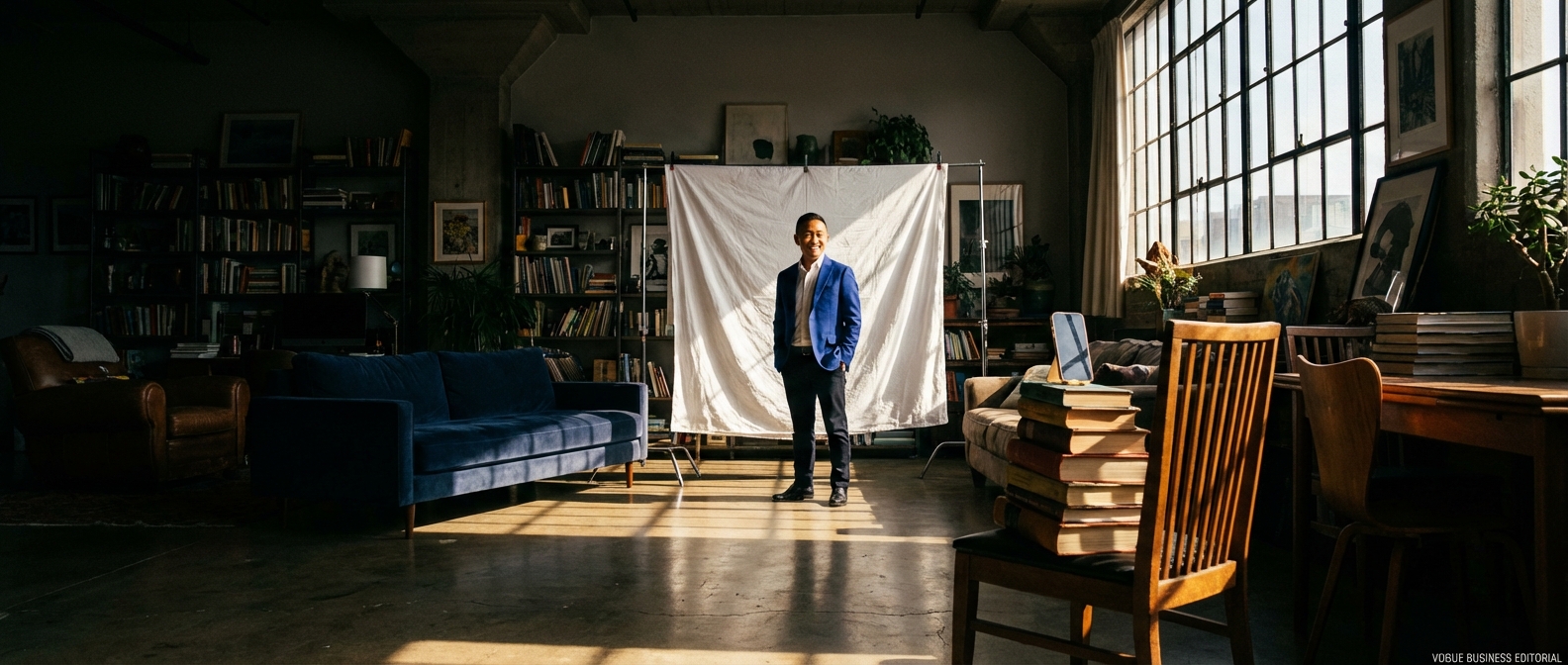
Before you spend money on equipment, here's the reality: most professional headshots are 90% lighting and 10% everything else. You don't need a DSLR, a ring light, or a studio backdrop stand. Here's what matters and what doesn't:
What you need (and already have):| Item | What to use | Why it matters |
|---|---|---|
| Camera | Your phone (iPhone 12+ / comparable Android) | Modern Portrait mode simulates professional depth of field |
| Light source | A large window | Natural indirect light is better than most artificial setups |
| Background | A plain wall or a white sheet | Clean backgrounds keep focus on your face. See background ideas by industry |
| Camera support | Tripod, stack of books, or a shelf at eye level | Eliminates arm-in-frame and selfie distortion |
| Shutter trigger | 10-second timer, Bluetooth remote, or Apple Watch | Lets you use the rear camera without touching the phone |
A ring light creates flat, shadowless lighting that looks artificial — it screams "video call setup," not "professional headshot." Professional studio lights cost $200+ and require knowledge to position correctly. A DSLR is superior to a phone, but the gap has narrowed dramatically — and unless you already own one, the investment doesn't make sense when your phone is in your pocket.
Step 1: Set Up Your Window Light
Lighting makes or breaks a headshot. Professional photographers charge hundreds of dollars partly because they know how to control light. At home, a window is your studio.
Find the right window. You want the largest window available, ideally one that doesn't get direct sunlight at the time you'll be shooting. North-facing windows are ideal because they provide consistent, soft, indirect light throughout the day. East-facing windows work in the afternoon; west-facing in the morning. Turn off every indoor light. This is the most common DIY mistake. Overhead room lights cast ugly downward shadows under your eyes, nose, and chin — the "raccoon eyes" effect. Worse, mixing indoor artificial light (warm/orange) with window light (cool/blue) creates uneven skin tones that are nearly impossible to fix in editing. Kill every light in the room. Window light only. Position yourself facing the window. Stand or sit so the window is directly in front of you. Your phone goes between you and the window (slightly off to one side so you're not in your own shadow). The light should fall evenly across your face. If one side of your face is significantly brighter than the other, angle your body slightly toward the light source until both sides are close to even. Diffuse harsh sunlight. If direct sun is coming through the window, hang a white bedsheet or sheer curtain over the glass. This transforms hard, directional sunlight into soft, wrapping light — exactly the kind studios pay thousands to replicate with softboxes. Timing matters. Overcast days are a gift — the clouds act as a giant diffuser, creating beautiful, even light. Mid-morning (9-11 AM) and mid-afternoon (2-4 PM) typically offer the best balance of brightness and softness. Avoid noon (sun too high, too harsh) and late evening (too dim, introduces motion blur).Step 2: Create Your Background
Your background should be invisible — the viewer should notice your face, not the wall behind you.
Option A: A plain wall. White, off-white, or light gray walls make the simplest backgrounds. Check for scuff marks, picture hooks, or switch plates — anything in the crop zone needs to be removed or covered. Matte paint is better than glossy (glossy creates reflections). Option B: A hung sheet or fabric. If your walls are textured, colored, or cluttered, hang a plain white bedsheet from a curtain rod, command hooks, or a tension bar. Pull it taut so there are no visible wrinkles — wrinkles catch light and create distracting shadows. A wrinkle-free fabric is critical; iron or steam it first. Option C: An outdoor wall or fence. If the weather cooperates, an exterior wall in open shade (lit by sky light but not direct sun) can produce beautiful, naturally blurred backgrounds. Brick, stucco, or ivy-covered walls add subtle texture without distraction. The 3-foot rule. Stand at least 3 feet (1 meter) away from the background, whether it's a wall or a sheet. This distance creates a soft blur behind you when shooting in Portrait mode and prevents you from casting a shadow onto the backdrop. The farther you are from the background, the more professional the blur.Step 3: Position Your Phone
How you position your phone determines whether the result looks like a professional headshot or a selfie. Three factors matter: height, distance, and which camera you use.
Height: Eye level. The camera lens should be at your eye height. Too low and the camera shoots up your nostrils (the "Myspace angle" in reverse — nobody looks good from below). Too high and you get the "2008 selfie" look with a giant forehead and tiny body. Eye level creates the neutral, professional perspective that studios use.If you have a phone tripod, set it to your seated or standing eye height. No tripod? Stack books on a table or shelf until the phone sits at the right level. A bookshelf, windowsill, or kitchen counter can all work — as long as the camera is stable and at eye height.
Distance: 4-6 feet away. This is the range that replicates the focal length of a professional headshot lens (85-135mm equivalent). At arm's length, your phone's wide-angle lens distorts your face — enlarging the nose and compressing the ears, creating the unmistakable "selfie look." At 4-6 feet, these proportions normalize and your face looks like it does in real life. Camera: Always use the rear camera. The rear (outward-facing) camera on your phone has a significantly larger sensor, better lens, and more advanced image processing than the front selfie camera. The quality difference is substantial — sharper detail, better low-light performance, more natural color, and less lens distortion. Yes, this means you can't see yourself while shooting. That's what the timer is for.Step 4: Dial In Your Phone Settings
A few settings make a meaningful difference in the final result.
Portrait mode ON. Every modern iPhone and flagship Android phone has a Portrait mode that uses computational photography to blur the background while keeping your face sharp. This simulates the shallow depth of field that separates professional headshots from snapshots. On iPhone, Portrait mode uses the 2x telephoto lens by default, which is the better lens for headshots. Lighting effect: "Natural Light" or "Studio Light." On iPhone, Portrait mode offers lighting effects. "Natural Light" preserves whatever lighting you've set up (your window). "Studio Light" adds a subtle brightening to the face that can be flattering. Avoid "Stage Light" and "Stage Light Mono" — these crop your background to black, which looks artificial. Timer: 10 seconds. Set the countdown timer so you have time to walk to your mark, settle your posture, and compose your expression. Three seconds isn't enough — you'll look rushed. On iPhone, the timer automatically captures a 10-shot burst, giving you multiple expressions to choose from. Resolution: Maximum. Go into camera settings and ensure you're shooting at the highest resolution available. If your phone supports RAW/ProRAW, use it — RAW files preserve more detail and give you more flexibility in editing. If not, the default JPEG at maximum quality is fine. Zoom: 2x (if available). If your phone has a telephoto lens (most flagships since 2020), use 2x zoom. This lens is closer to the focal length portrait photographers use and produces more flattering facial proportions than the default wide-angle. If your phone doesn't have a telephoto lens, don't use digital zoom — it just crops and degrades quality. Instead, increase the physical distance between you and the phone.Step 5: Nail the Pose and Expression
This is where most DIY headshots fall apart — not because of equipment, but because it's genuinely awkward to pose alone in your living room. Here's how to get past it.
Take at least 50 shots. This isn't vanity. Professional photographers shoot hundreds of frames to get one great headshot. With a 10-second timer and burst mode, you can capture 10 frames per trigger. Five rounds gives you 50 shots. The best expression is usually in shots 30-50, after you've loosened up and stopped thinking about the camera. The "reset" technique. Between bursts, look away from the camera, close your eyes, take a breath, then turn back and make eye contact with the lens right as the timer fires. This creates a natural, engaged expression instead of a frozen stare. Professional photographers use this technique constantly — they talk to you, make you laugh, then capture the micro-expression that follows. Slight angle, not straight-on. Turn your body 15-20 degrees away from the camera (one shoulder slightly closer to the lens) while keeping your face turned toward the camera. This "three-quarter pose" is the standard for professional headshots — it slims the torso and adds dimension that a straight-on mug shot doesn't have. Jaw forward and down. This is the single most flattering micro-adjustment for headshots. Push your chin slightly forward and tilt it fractionally downward. It defines the jawline, eliminates any hint of double chin, and makes the eyes appear larger. It feels weird, but it looks great on camera. One photographer's trick: imagine a string pulling the top of your head toward the ceiling while your chin pushes forward — like a turtle sticking its head out. Eyes to the lens. Direct eye contact with the camera lens creates connection and confidence. If you're using the rear camera, make sure you know exactly where the lens is and look directly at it — not at the screen, not at the phone body, at the lens itself. Even a slight mismatch between your gaze and the lens creates a disconnected, off-putting look. Expression: Think of someone you like. The most natural smiles come from genuine emotion. Right before the timer fires, think of someone whose company you enjoy — a friend, a partner, a kid. The resulting micro-expression reads as warm and authentic on camera, which is more effective than any forced smile.Professional headshots from $10.49
Upload a selfie. Get studio-quality headshots in 60 seconds.
Upload a Selfie → Get Team HeadshotsStep 6: Edit (But Don't Overdo It)
Editing is where you polish the raw capture into a professional result. The key principle: less is more. Over-editing is the fastest way to make a DIY headshot look amateur.
Free editing apps that work:| App | Platform | Best for |
|---|---|---|
| Snapseed | iOS, Android | Overall editing — exposure, color, sharpening |
| Lightroom Mobile | iOS, Android | Fine-tuned control — shadows, highlights, color mixing |
| Photos (built-in) | iOS, Android | Quick fixes — auto-enhance, crop, straighten |
Crop to a head-and-shoulders frame with your face filling 60-70% of the image. Straighten the horizon if the phone was slightly tilted. Bump the "shadows" slider up slightly to open up dark areas under your chin and eyes. If the image is slightly warm or cool, adjust the white balance until your skin looks natural. Add a touch of sharpening to the eyes — this is the first thing viewers focus on, and crisp eyes make the entire image feel sharper.
What NOT to do:Don't over-smooth your skin — it creates an uncanny, plastic look. Don't crank the saturation — oversaturated skin tones look unnatural. Don't apply heavy filters or presets that dramatically change the color mood. Don't whiten your eyes or teeth beyond what looks natural. The goal is "you, on your best day" — not "you, retouched beyond recognition."
The Honest Comparison: DIY vs. AI vs. Studio
Here's the truth: a well-executed DIY headshot can look professional. But most DIY headshots don't look professional — because most people don't have 30 minutes of setup time, great natural light, a suitable background, and the patience to take 50+ shots and edit the best one. Here's how the options stack up:
| Factor | DIY at Home | AI Headshot Generator | Professional Studio |
|---|---|---|---|
| Cost | $0 (phone you own) | $10.49–$29.99/person | $150–$500/session |
| Time investment | 30-60 min setup + editing | Under 60 seconds | 2-3 hours + 1-3 week delivery |
| Equipment needed | Phone, window, clean wall | Phone (for selfie upload) | Nothing — studio provides all |
| Skill required | Moderate (lighting, posing, editing) | None | None (photographer directs you) |
| Consistency | Variable — depends on conditions | Identical quality every time | High — photographer controls all |
| Wardrobe options | Whatever you own | AI generates multiple outfits | Whatever you bring to the session |
| Background options | One (your wall/sheet) | Multiple professional backgrounds | Multiple studio setups |
| Output quantity | 1-3 usable shots per session | 40-200+ professional variations | 5-20 edited images |
| Best for | People who enjoy photography, have good light, and want full control | Most professionals who want quality results quickly | Senior executives, actors, or anyone whose image is core to their brand |
For a detailed cost breakdown of all options, see our professional headshots cost guide.
Common DIY Headshot Mistakes (and How to Fix Them)
Even with the right setup, these mistakes trip up first-timers:
Mistake 1: Overhead room lights left on. This is the #1 quality killer. Overhead lights create raccoon-eye shadows and mix warm artificial light with cool window light, producing muddy skin tones. Fix: turn off every light in the room. Window only. Mistake 2: Too close to the background. Standing against the wall creates a flat, mugshot-like image with no depth. It also means your shadow appears on the wall. Fix: stand 3-4 feet away from the background. Mistake 3: Using the front (selfie) camera. The front camera has a smaller sensor, wider lens, and less processing power. It distorts facial proportions and produces lower-quality images. Fix: always use the rear camera with a timer. Mistake 4: Arm's-length selfie distance. Holding the phone at arm's length warps your face — the nose looks bigger, ears look smaller, and the overall proportions look unnatural. Fix: place the phone 4-6 feet away on a stable surface at eye level. Mistake 5: Only taking 5-10 shots. Expression is the hardest variable to control. You need volume to find the frame where your smile looks natural, your eyes are engaged, and nothing is awkward. Fix: take at least 50 shots across 5+ timer rounds. Mistake 6: Over-editing. Excessive skin smoothing, eye whitening, and saturation adjustments make you look artificial. Recruiters and colleagues will notice the disconnect when they meet you on a video call. Fix: edit for exposure, crop, and sharpness only. Leave your face alone. Mistake 7: Shooting at the wrong time of day. Dim evening light introduces noise and motion blur. Direct midday sun creates harsh shadows. Fix: shoot between 9 AM and 4 PM on a day with soft light (overcast is best).For tips on wardrobe choices, see our what to wear for professional headshots guide. For expression and posing techniques, see our professional headshot tips guide.
Your At-Home Headshot Checklist
Run through this before and during your session:
Setup:- [ ] Large window identified; no direct sun hitting the glass
- [ ] All room lights turned off
- [ ] Background is clean, plain, and wrinkle-free
- [ ] Phone positioned 4-6 feet away, at eye level
- [ ] Rear camera selected, Portrait mode on
- [ ] Timer set to 10 seconds
- [ ] Resolution set to maximum / ProRAW if available
- [ ] 2x zoom if telephoto lens available
- [ ] Body angled 15-20 degrees from the camera
- [ ] Chin slightly forward and down
- [ ] Eyes directly on the lens (not the screen)
- [ ] At least 50 shots taken across 5+ rounds
- [ ] Used the "look away, breathe, turn back" reset between rounds
- [ ] Cropped to head-and-shoulders (face fills 60-70%)
- [ ] Image straightened
- [ ] Shadows lifted slightly
- [ ] Eyes sharpened subtly
- [ ] No over-smoothing, over-saturation, or heavy filters
Skip the Setup. Get Studio Quality in 60 Seconds.
Taking professional headshots at home is entirely possible — but it takes time, the right conditions, and a lot of trial and error. TeamShotsPro eliminates all of that.
Upload a single selfie. Get 40+ professional headshot variations with studio lighting, clean backgrounds, and polished wardrobe — delivered in under a minute.
No window required. No tripod. No editing.
Try TeamShotsPro →Related Reading
- What Are Professional Headshots? Full Guide — Complete overview of professional headshots in 2026
- Professional Headshot Tips: Studio Quality Fast — Lighting, posing, expression, and wardrobe tips
- Professional Headshots Cost Breakdown — Pricing for traditional, DIY, and AI photography
- What to Wear for Professional Headshots — Colors, fabrics, and necklines that photograph best
- Professional Headshots for LinkedIn — LinkedIn-specific photo optimization
Frequently Asked Questions
Can I take a professional headshot with my phone?▼
Yes. Modern smartphones (iPhone 12+ or comparable Android) have sensors and portrait modes capable of producing professional-quality headshots. The key is not the camera — it's the lighting, background, and composition. With proper window light and a clean backdrop, a phone headshot can rival studio work.
What is the best lighting for headshots at home?▼
A large window with indirect natural light is the single best lighting source for DIY headshots. Face the window so the light hits your face evenly. Avoid direct sunlight (too harsh) and overhead room lights (create unflattering shadows under your eyes and chin). The ideal time is mid-morning or mid-afternoon when daylight is strong but not directly hitting the window.
What background should I use for headshots at home?▼
A plain, light-colored wall is the simplest option. White, off-white, or light gray walls work well. If your walls are textured or colored, hang a white bedsheet taut from a curtain rod or command hooks. Stand 3-4 feet away from the wall to create a soft background blur and avoid casting shadows onto it.
Should I use the front or rear camera for headshots?▼
Always use the rear (outward-facing) camera. It has a significantly better sensor, lens, and image processing than the front selfie camera. Use a timer or Bluetooth remote to trigger the shutter. The selfie camera is convenient but produces noticeably lower quality — wider distortion, less detail, and more noise in low light.
How do I avoid the "selfie look" in a DIY headshot?▼
Three things create the selfie look: arm-length distance (too close), front camera distortion (lens warps your face), and looking down at the screen. Fix all three by using a tripod or stack of books at eye level, the rear camera with a 10-second timer, and standing 4-6 feet from the phone. This setup produces proportions identical to a studio headshot.
Is it better to take my own headshot or use AI?▼
DIY headshots can look professional with the right setup, but they require 30-60 minutes of effort plus editing. AI headshot generators like TeamShotsPro produce studio-quality results from a single selfie in under 60 seconds, with professional lighting, backgrounds, and wardrobe already applied. For most people, AI is faster, easier, and produces more consistent results.
Do I need a ring light for headshots?▼
No. Ring lights create flat, shadowless lighting that looks artificial and is immediately recognizable as a "video call setup" rather than a professional headshot. A large window with indirect natural light produces far better results — softer, more dimensional, and more flattering. If you must use artificial light, a single LED panel placed to one side at 45 degrees is more professional than a ring light.
Ready to get started with TeamShotsPro?
Generate professional AI headshots in 60 seconds.
Upload a Selfie → Get Team Headshots
About the Author
Founder & CEO, TeamShotsPro
Matthieu van Haperen runs TeamShotsPro, where he has helped hundreds of teams get professional AI headshots. Before founding TeamShotsPro, he spent 6+ years building and scaling tech startups. He writes about professional photography, team branding, and how AI is reshaping corporate imagery.
Connect on LinkedIn →